1
Facebook Account
2
Facebook Page
3
Connect your IG
4
Connect to Snatch
Link Instagram to the Facebook page
This step connects your Instagram to the Facebook Page you just created.
This step takes 5-6 minutes.

*Already connected Instagram to your existing Facebook page? Continue to Step 4
If you haven't connected your Instagram to a business page:
Go to your Facebook Page, then click ‘Settings' in the left-hand menu.
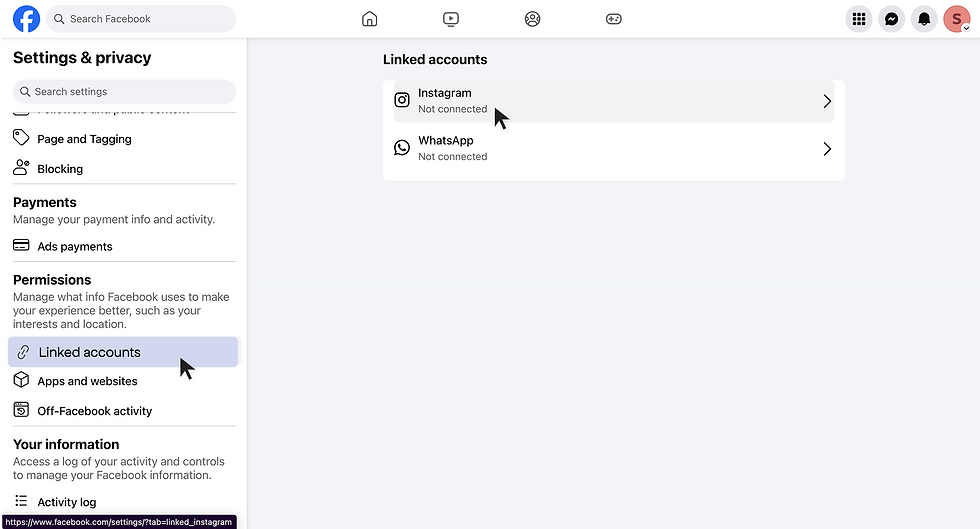
1. In the Settings menu, go to Permissions → Linked Accounts.
2. Select Instagram
3. Click ‘Connect Account to begin'*
It may prompt you to allow access to your Instagram inbox, go ahead and confirm! Don't worry, only you can see this data😊
*You’ll need to have a business or creator Instagram account to complete the connection.

Enter your Instagram login details.
Use the account you want displayed on your Snatch profile.
1. Hit ‘Tab' on your keyboard to move to the OTP input box (it may be hidden behind the loading screen).
2. Type the 6-digit code you received on WhatsApp.
3. Press ‘Enter' on your keyboard to complete verification — no need to click anything else!

Click ‘Confirm'!
Facebook may prompt you to create a business portfolio — that’s just Meta’s way of grouping your Facebook page and Instagram under one professional profile. That’s expected, and totally fine.
🤩 Your Instagram is now linked to your Facebook page — ready to link to Snatch!


The next step’s desktop-exclusive (we know, ugh!)
This step needs a desktop or laptop . Meta only allows Facebook–Instagram linking through a browser on larger screens.
Hop on a computer to continue setup.
We’ll be right here when you’re back.
